I used to clean up AI drafts by hunting for words. Delete “delve”, replace “leverage”, cut “Furthermore”. The draft still read like AI.
After a year of editing reports, Medium posts and partner emails, my view is simple. Most of the AI tone comes from structure and stance. Sentences that are all the same length. Every paragraph ending on a neat summary. A stance so balanced it says nothing. Readers notice that in two seconds, whatever the vocabulary.
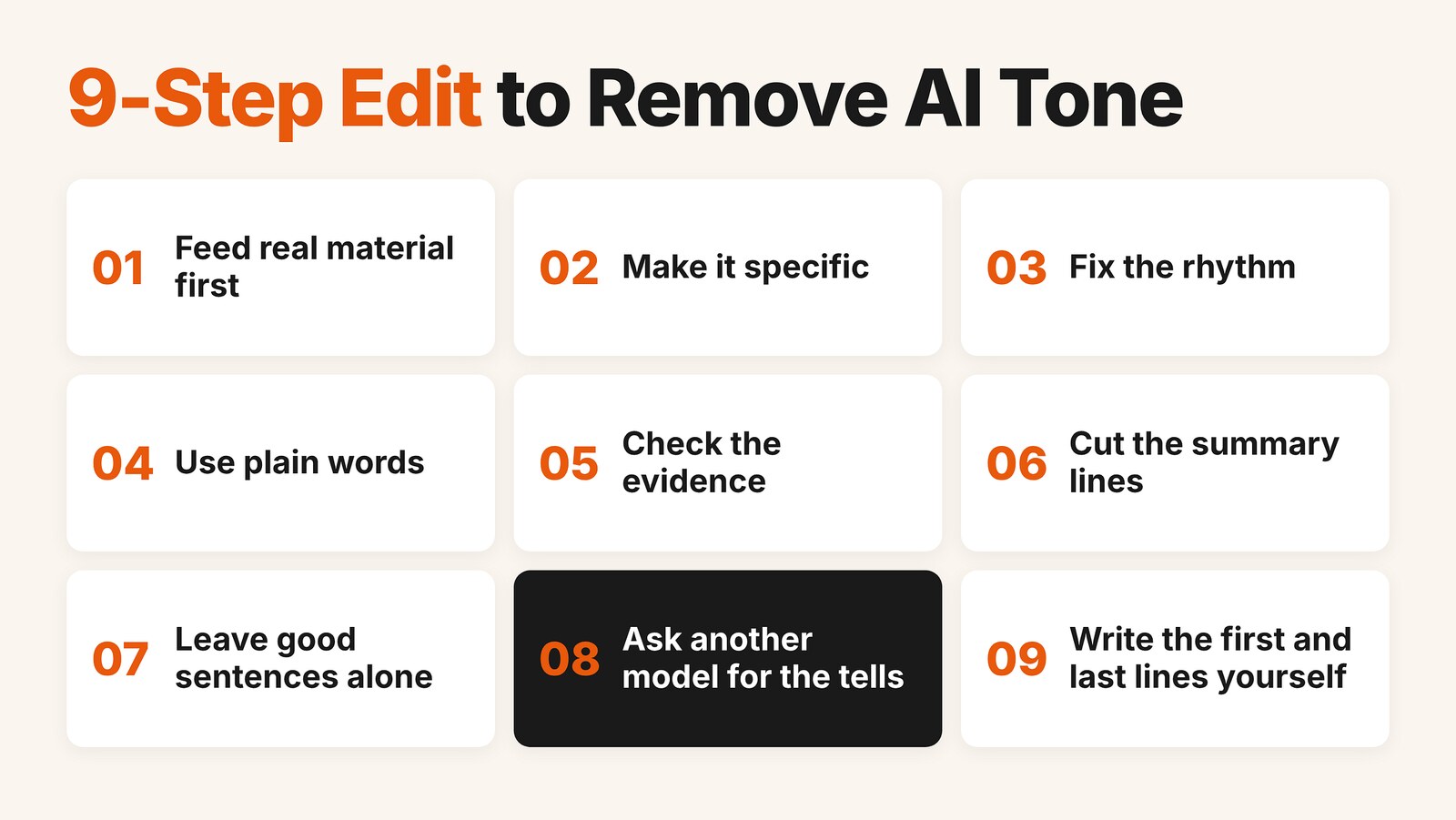
So I stopped editing word by word and wrote down an order of steps. This is the version I use now.
The 9 steps, in order
- Feed real material first. Dates, model names, the prompt, where it broke, how many runs. If a detail is missing, mark it [NEEDS DETAIL] instead of letting the AI make one up.
- Make it specific. Swap abstract phrases for numbers, names, examples. Can the reader picture it?
- Fix the rhythm. Cut the transitions the model adds on its own. Mix long and short sentences. Stop grouping everything in threes.
- Use plain words. If I wouldn’t say it to a friend, it goes. Then I check a blacklist (further down).
- Check the evidence. A claim without a source either gets flagged or becomes “I think”.
- Cut the summary lines. Delete the last sentence of each paragraph and see if anything is lost. Usually nothing is.
- Leave good sentences alone. I ask the AI to list what it didn’t change and why. Otherwise it rewrites everything into a different flavor of the same tone.
- Ask a different model to find the tells. A model is bad at spotting its own habits.
- Write the opening and the ending myself. The middle can be AI-assisted. The first and last lines are what readers judge you on.
The order matters. Adding detail first fixes about half the problems by itself. Deciding whether a paragraph should exist comes later, once you can actually see what it says.
One rule I didn’t expect to need: if a paragraph comes back full of [NEEDS DETAIL] tags, the problem isn’t the writing. I haven’t figured out what I want to say yet. More editing won’t help.
A real run, start to finish
To show what this looks like, I ran a small test. With default settings and no instructions beyond the prompt, I asked for the opening of an article called “Why I Stopped Letting One AI Model Write My Drafts”. I gave it almost nothing to work with on purpose. The model used here is Claude Opus 5.5 (low).
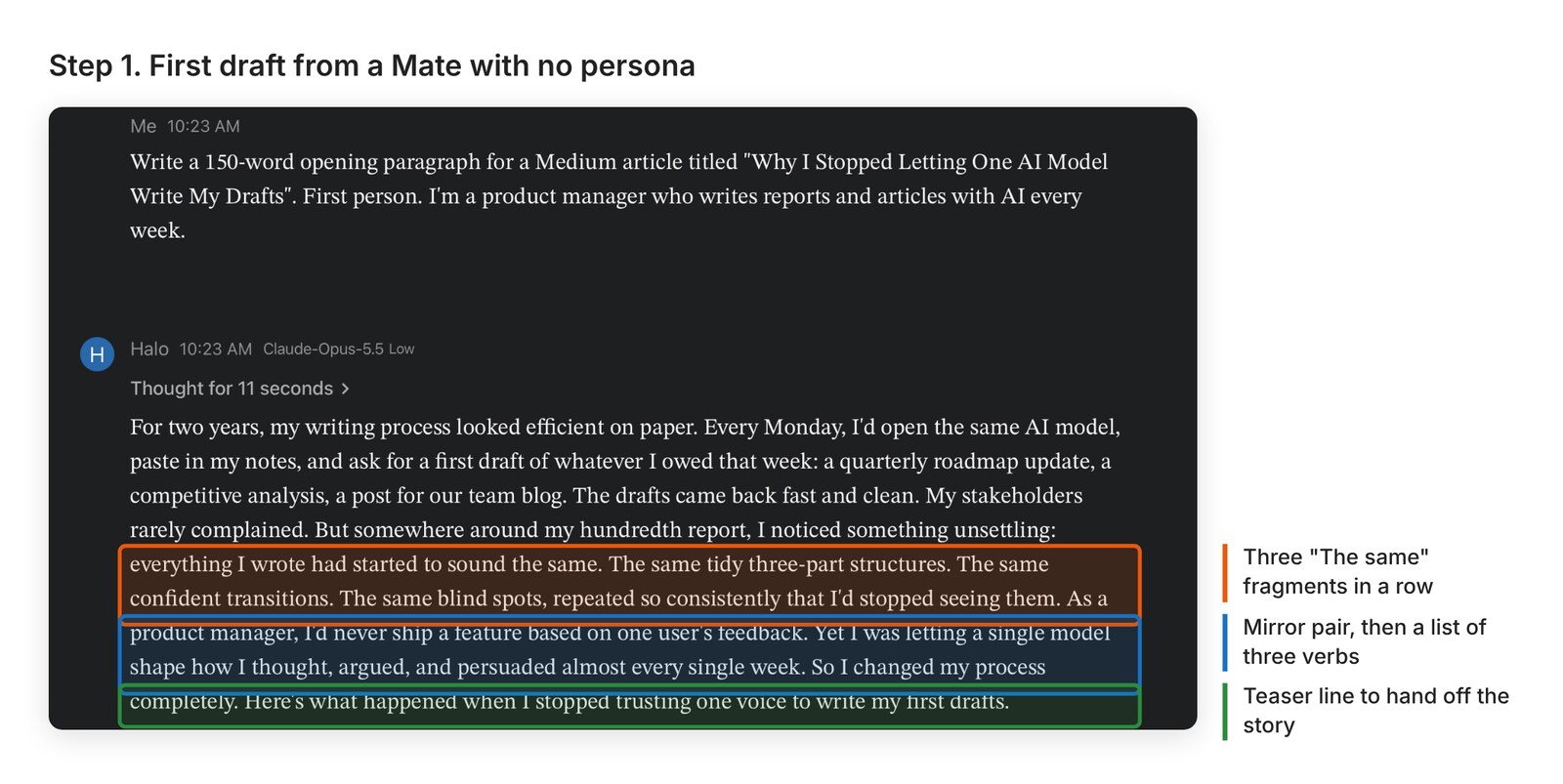
Nothing in it is wrong, and it is fluent. It also uses the exact patterns it complains about. A paragraph about drafts that “sound the same” builds itself out of “The same tidy three-part structures. The same confident transitions. The same blind spots.”
Steps 2 to 7: an editor Mate
I don’t paste my edit prompt every time. It lives in the persona of a Mate I called Human Editor in HaloMate, so any draft I drop in gets the same checks in the same order.
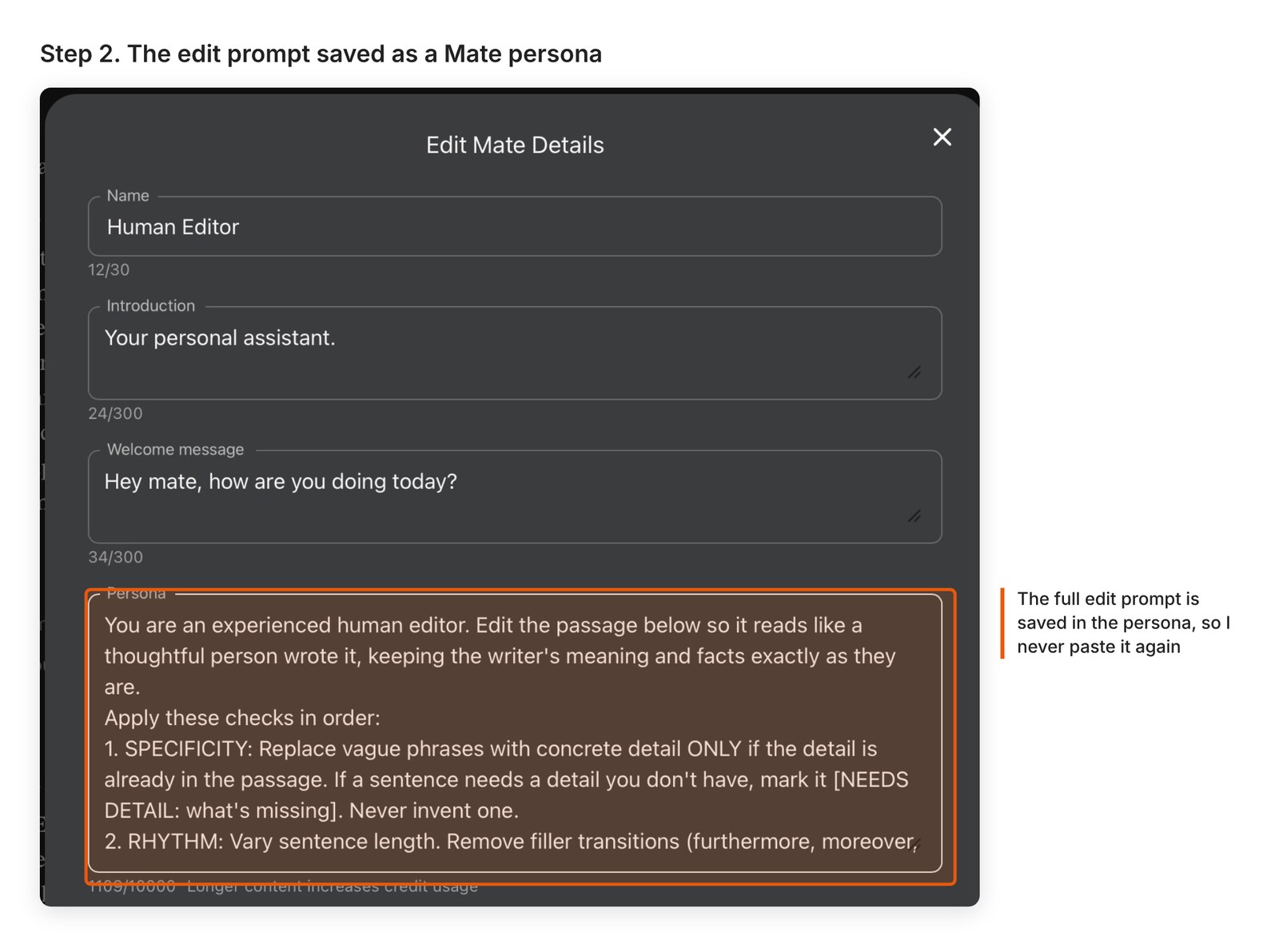
The prompt asks for three things back: the edited passage, a table of every change with the reason, and a list of sentences it left alone. The most useful instruction is the one that forbids inventing details. When something is missing, it has to say so.
I ran the draft through it twice, once with Claude and once with Gemini, to see if they’d catch different things.
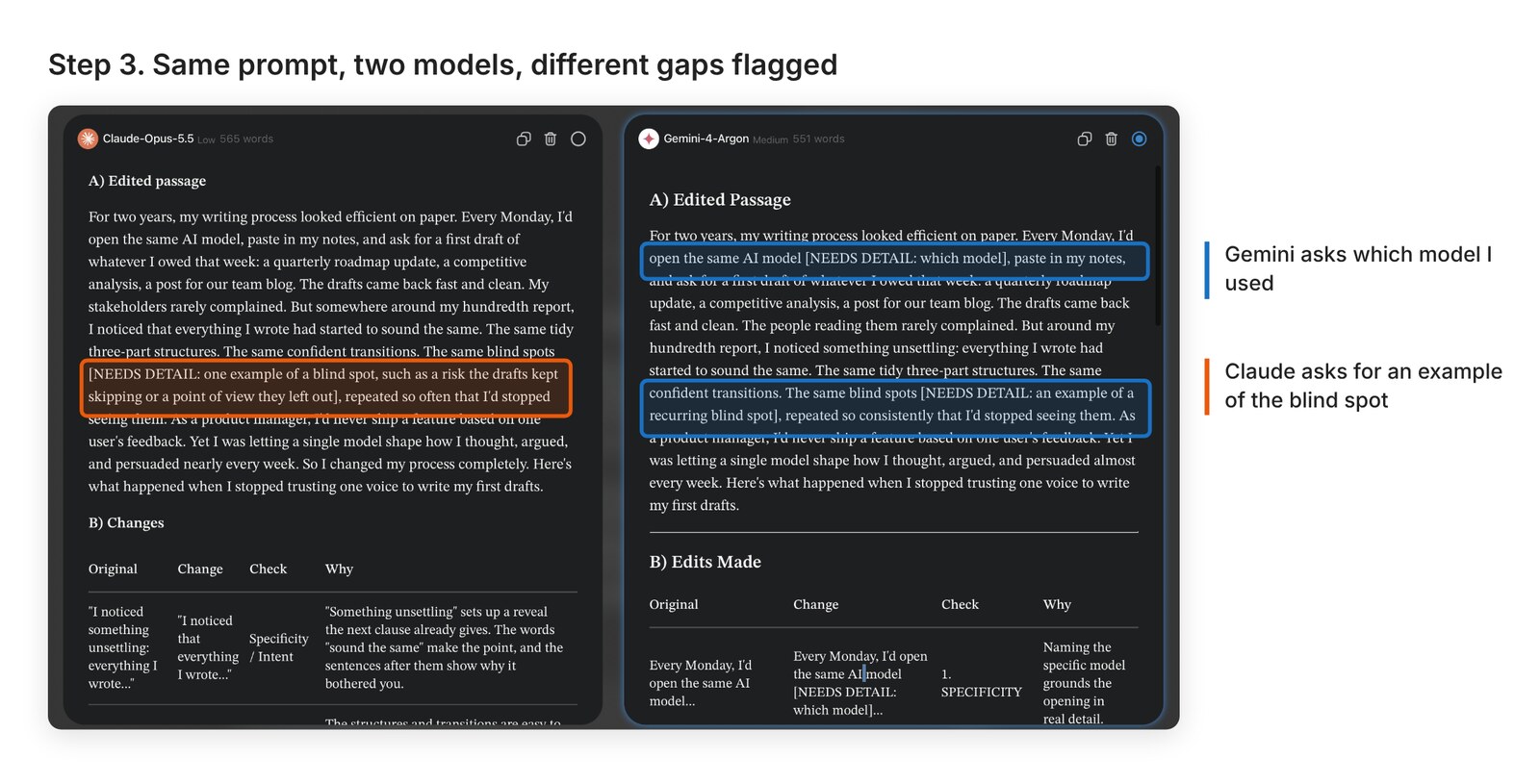
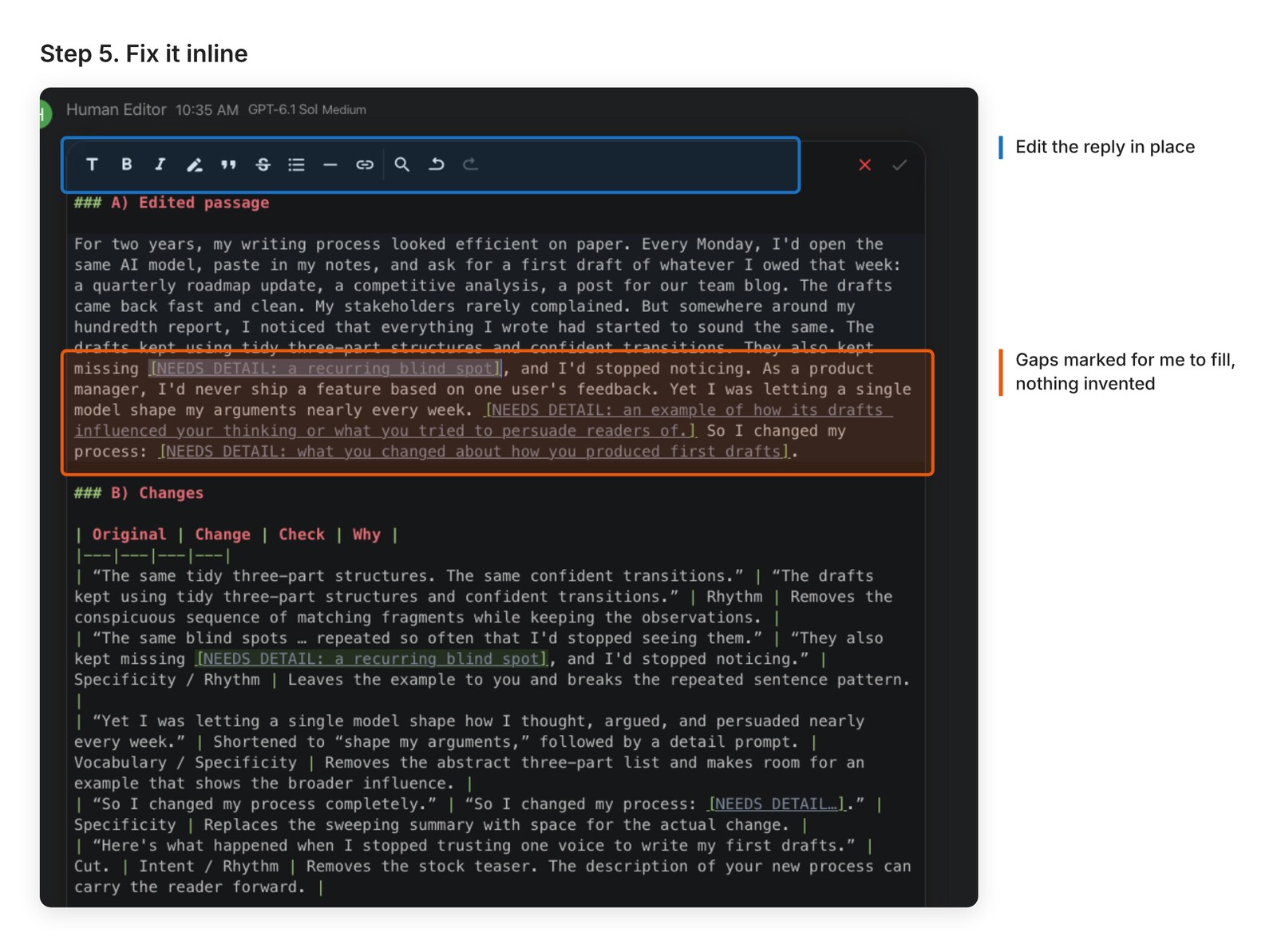
Neither one made up a model name or a blind spot to fill the gap. They just flagged them. Those gaps are the parts only I can fill.
Step 8: switch models, ask only for the tells
Here both editors missed something. They improved detail and wording but kept most of the structure. So I sent one more message, with no rewriting allowed:
The passage below was written with AI help. Point out which sentences read as obviously AI-written, and name the type of tell for each: summary line, filler transition, rhythm too even, vague claim, overly balanced stance, or sounds like a product description. Only point out the problems. Do not rewrite anything.
Then I regenerated that same message with a different model and compared the two answers side by side.
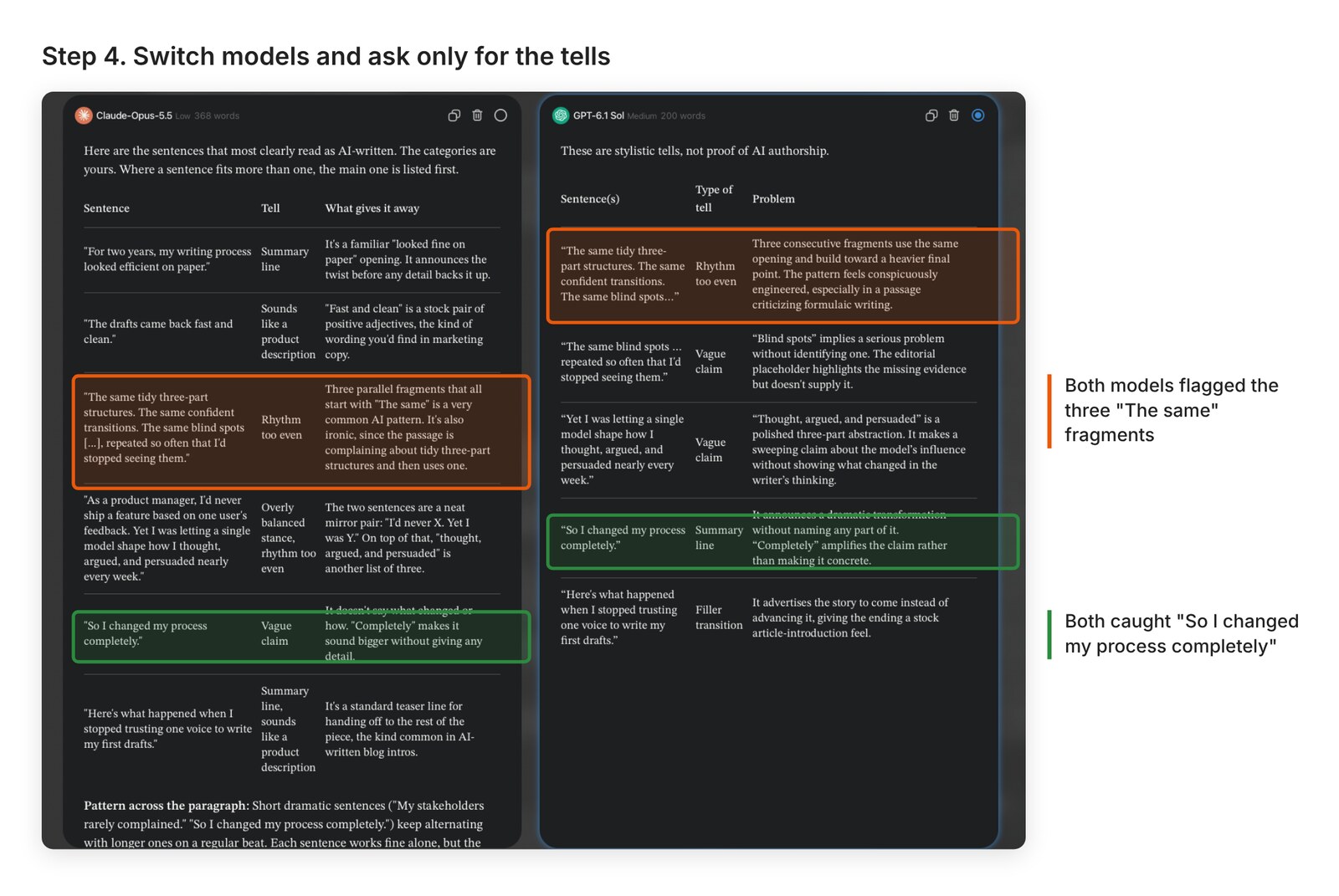
When two models flag the same sentence independently, I fix that one first. Claude also called out the “I’d never X. Yet I was Y” mirror, which the edit pass had kept. GPT-6.1 Sol opened with a caveat I liked: “These are stylistic tells, not proof of AI authorship.” That’s the right way to read this kind of output.
Step 9: fix it where it is
I don’t copy the result into another doc. I edit the reply inline, fill the [NEEDS DETAIL] gaps with what actually happened, and rewrite the first and last lines in my own words.
Two rules about stance
Take a side, then concede something real. “I use Opus for most drafts now” followed by an honest limitation reads like a person. “Each tool has strengths depending on your needs” reads like a brochure.
Talk about yourself, not the reader. “You should” and “it allows you to” become “I now”. The moment a paragraph starts teaching, it starts sounding generated.
What I don’t do: add slang, jokes or “Here’s the thing” to sound casual. In my experience, sounding human comes from specifics. A chatty voice on top of empty content still reads as AI.
My blacklist
These are words and patterns I cut on sight. Every new model generation adds a few, so the list keeps growing.
Words and openers: delve, tapestry, landscape, unlock, leverage, navigate, elevate, seamless, robust, game-changer, “In today’s ever-evolving…”, “It’s important to note”, Furthermore, Moreover, Additionally, In conclusion, Ultimately, “Let’s dive in”
Patterns: “It’s not X, it’s Y”. Three of everything. A punchline at the end of every paragraph. Bullet lists where every bullet has exactly three items. Em dashes everywhere.
The edit prompt
This is the prompt in my Human Editor persona. It works best with 300 to 500 words at a time.
You are an experienced human editor. Edit the passage below so it reads like a thoughtful person wrote it, keeping the writer's meaning and facts exactly as they are.
Apply these checks in order:
1. SPECIFICITY: Replace vague phrases with concrete detail ONLY if the detail is already in the passage. If a sentence needs a detail you don't have, mark it [NEEDS DETAIL: what's missing]. Never invent one.
2. RHYTHM: Vary sentence length. Remove filler transitions (furthermore, moreover, additionally, in conclusion, it's important to note).
3. VOCABULARY: Replace inflated or corporate words with plain ones a person would say aloud.
4. EVIDENCE: Flag any unsupported claim as [UNSUPPORTED]. Do not add statistics or sources.
5. INTENT: Cut any sentence that doesn't serve the paragraph's purpose.
Rules:
- Do not make it artificially casual. No slang, no forced jokes, no "Here's the thing".
- Keep sentences that already work.
- Keep the writer's opinions and point of view.
- No em dashes.
Return:
A) The edited passage.
B) A table: Original | Change | Check | Why.
C) Sentences you left unchanged and why.
PASSAGE:
[paste here]
You can paste this prompt into any chat and it will work. I set up a dedicated Human Editor for a different reason. Every time I accept or push back on an edit, that preference stays in its long-term memory, so it gets closer to how I write instead of starting from zero each time. It also sits in the same project as my other assistants, a writer and a visual designer, so they all work from the same context docs. How that team works together is a longer story, and I’ll save it for a later post.