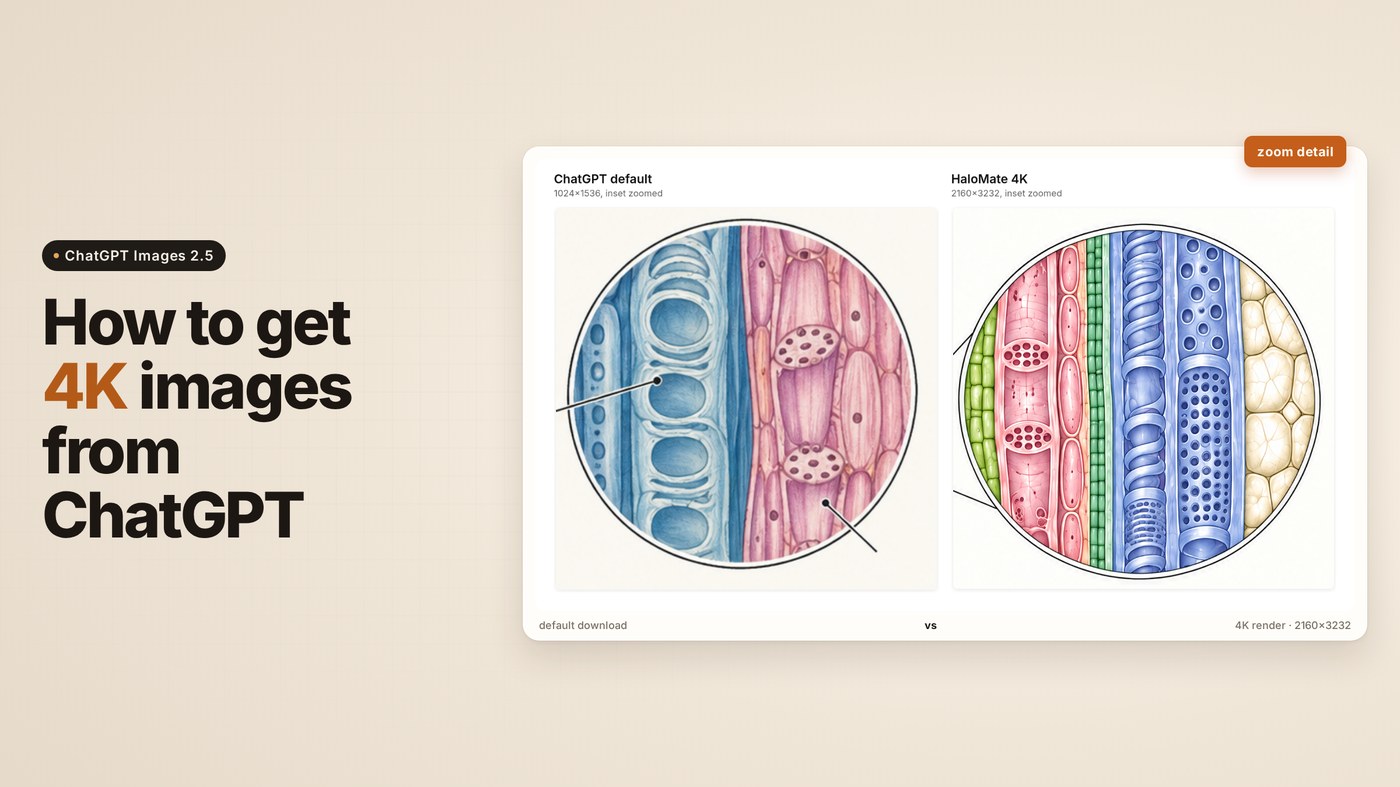
For a long time my image workflow looked like this. Project context lived in one place. I'd talk the idea through there, settle on a prompt, then copy it over to ChatGPT to actually generate the image. My logic was simple: it's OpenAI's model, so OpenAI's own app must give the best result.
Then I got lazy. One afternoon I didn't feel like switching tabs, so I just generated the image in the same workspace where the brief already was. After a few rounds I put everything side by side and looked properly.
It wasn't what I expected.
Same model family underneath. Pretty different results, and resolution turned out to be only part of the story. Here's what I found, and the other ways people try to squeeze 4K out of ChatGPT.
If you just want my answer, skip to Method 2.
First, why ChatGPT won't give you 4K
On September 8, OpenAI released ChatGPT Images 2.5. In the API it ships as two models: GPT-Image-2.5 Flare, the fast default, and GPT-Image-2.5 Sunburst, which OpenAI describes as offering "an extra level of precision for detailed creative work with longer generation times".
According to OpenAI's image generation docs, the model can output up to a 3840px edge. Anything above 2560×1440 is still marked experimental, but it's there. There are also several quality levels to choose from.
One note on what "4K" means in this piece. OpenAI's API max edge is 3840px. The high-res file I actually got in my test is 2160×3232. That's the 4K tier for that aspect ratio, not a promise that every run comes out 3840×2160.
Inside the ChatGPT app, you get none of those choices. No model picker, no resolution setting, no quality setting. You type, it generates, you download whatever it decides to give you. OpenAI's announcement only names Flare and Sunburst "for developers", and never says which one ChatGPT itself runs. People noticed. In the launch thread on r/codex, one user guessed that "Flare is the cheap/fast one, so perhaps they have a router that directs based on complexity". Another user on r/ChatGPT titled their post 2.5-sunburst is a mind-blowing improvement on 2.0...but 2.5-flare is..., after finding their old prompts only looked stunning with Sunburst "through the API".
I was on the free plan for this testing. OpenAI says Images 2.5 is rolling out "across all tiers", and I couldn't find anything official about a resolution picker for paid plans. A paid user on r/ChatGPT asked the same thing back in June: subscribed, still no 4K. And someone in the Images 2.5 launch thread said they got 4K through OpenArt, "but not directly through the ChatGPT desktop app".
My test prompt, same one for everything below:
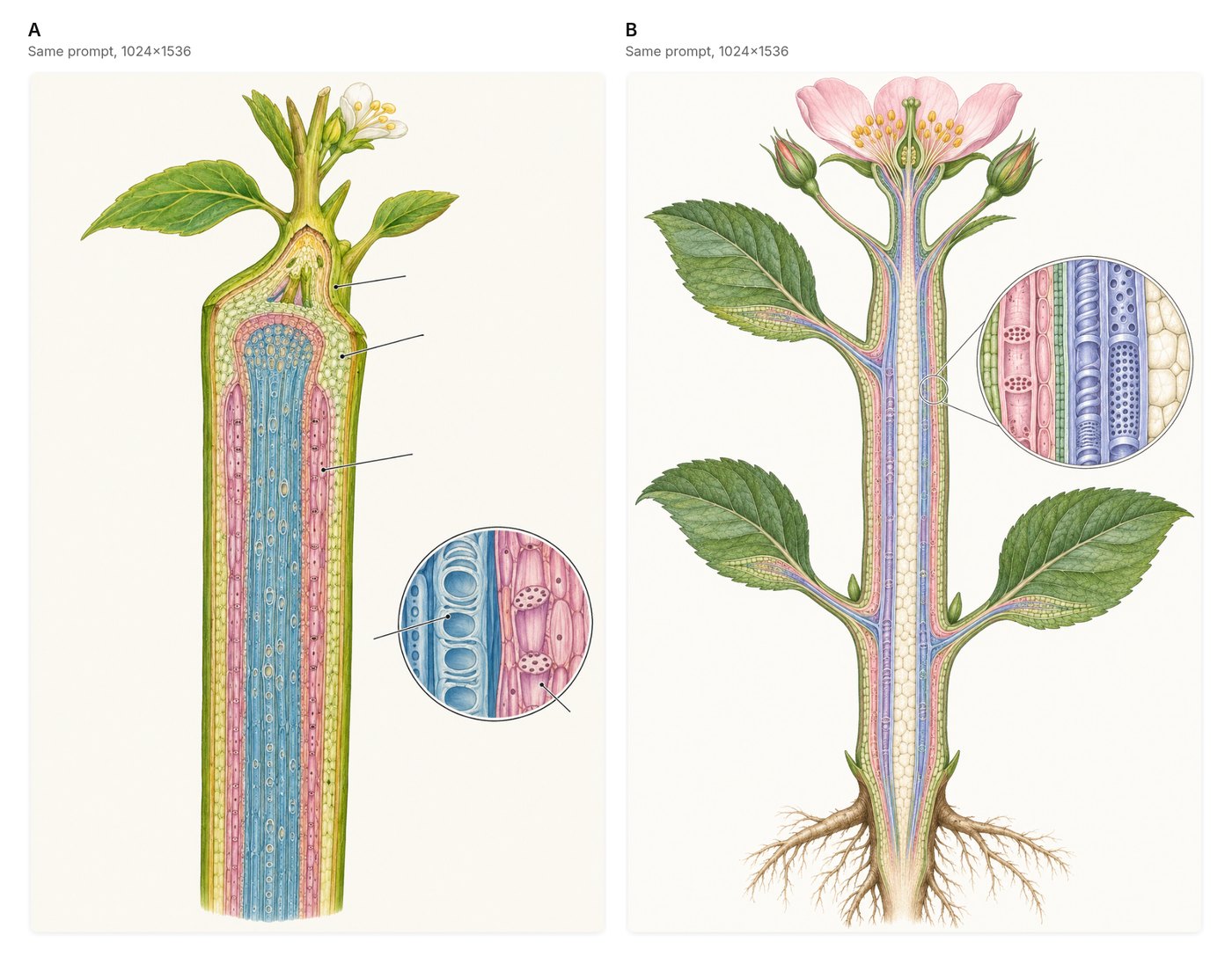
Clean scientific illustration of a longitudinal section of a flowering plant stem, labeled regions avoided (no text). Xylem and phloem textures distinct, soft pastel educational-atlas style on off-white background, high detail, publication figure quality, no watermark
I picked a botanical cross-section on purpose. It's the kind of image where detail actually matters: if the vessels are wrong, the figure is useless, no matter how many pixels it has.
Method 1: Just ask ChatGPT for 4K
The obvious move. Add "4K" or "ultra high resolution" to the prompt, or ask it to upscale an image it just made.
I took the image ChatGPT had just made and asked, "can you give me a 4k version of this image?" It said yes and produced a new one. Same composition, slightly different details. The downloaded file: 1024×1536. Exactly the same size as the original.
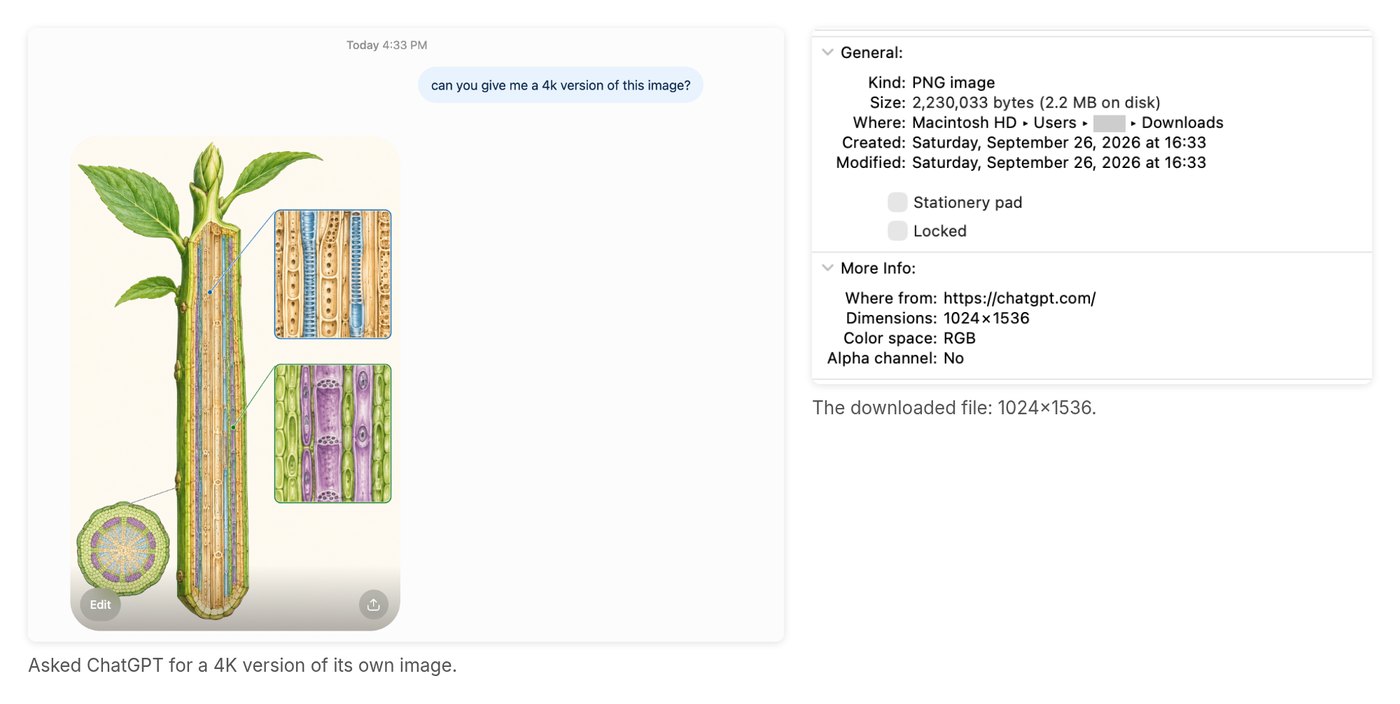
This has been a running joke on Reddit for a while. One user asked for a 4K image: "It said sure and gave me the same thing." Adding "4K" to a prompt changes the style the model aims for, not the file it outputs.
That said, for everyday image editing ChatGPT is genuinely nice to use. The new Sketch feature lets you doodle directly on the image to show what you want changed, which is faster than describing it in words. And on a subscription, you're not counting cost per image. If you just want to play around and don't care about pixels, it's great.
Method 2: Generate at 2K or 4K inside HaloMate (same OpenAI model)
This is the one that surprised me, and it's also just the laziest. I'm putting it second because it's what I actually use. The other three are what I tried along the way.
My projects already live in HaloMate: the brief, reference files, notes, past conversations. So instead of carrying a prompt over to ChatGPT, I now just ask for the image in the same chat. HaloMate calls the same GPT-Image-2.5 through OpenAI's API, so it's the same model, just a different door.
There's no setting for this. I typed "give me a 2K version" the same way I'd typed it into ChatGPT, and this time it actually happened. I didn't pick the engine in a menu. The run log afterwards showed gpt-image-2.5-sunburst, and the assistant had rewritten my prompt into a much more specific one. Then I asked for 4K. It used the 2K image as a reference and regenerated it at higher resolution, keeping the composition.
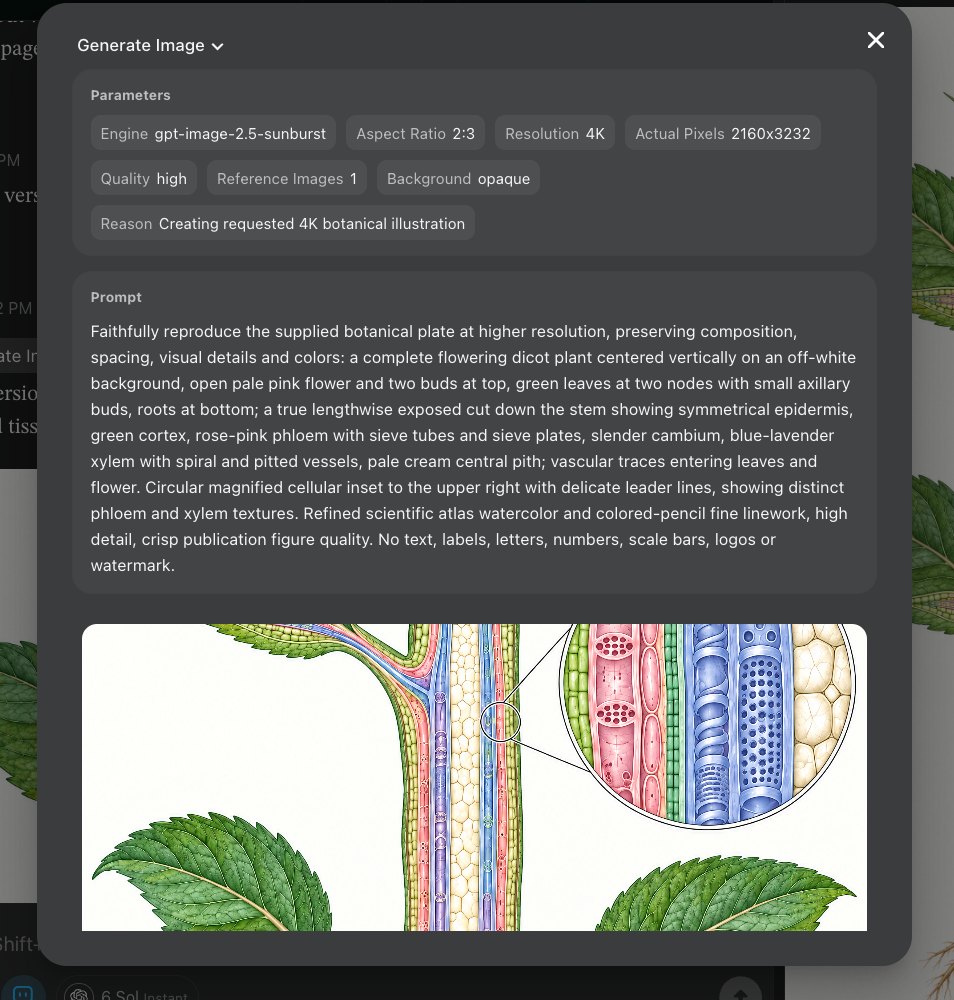
The final file is 2160×3232. And because it was built from the 2K image, not stretched from it, the detail holds up when you zoom in.
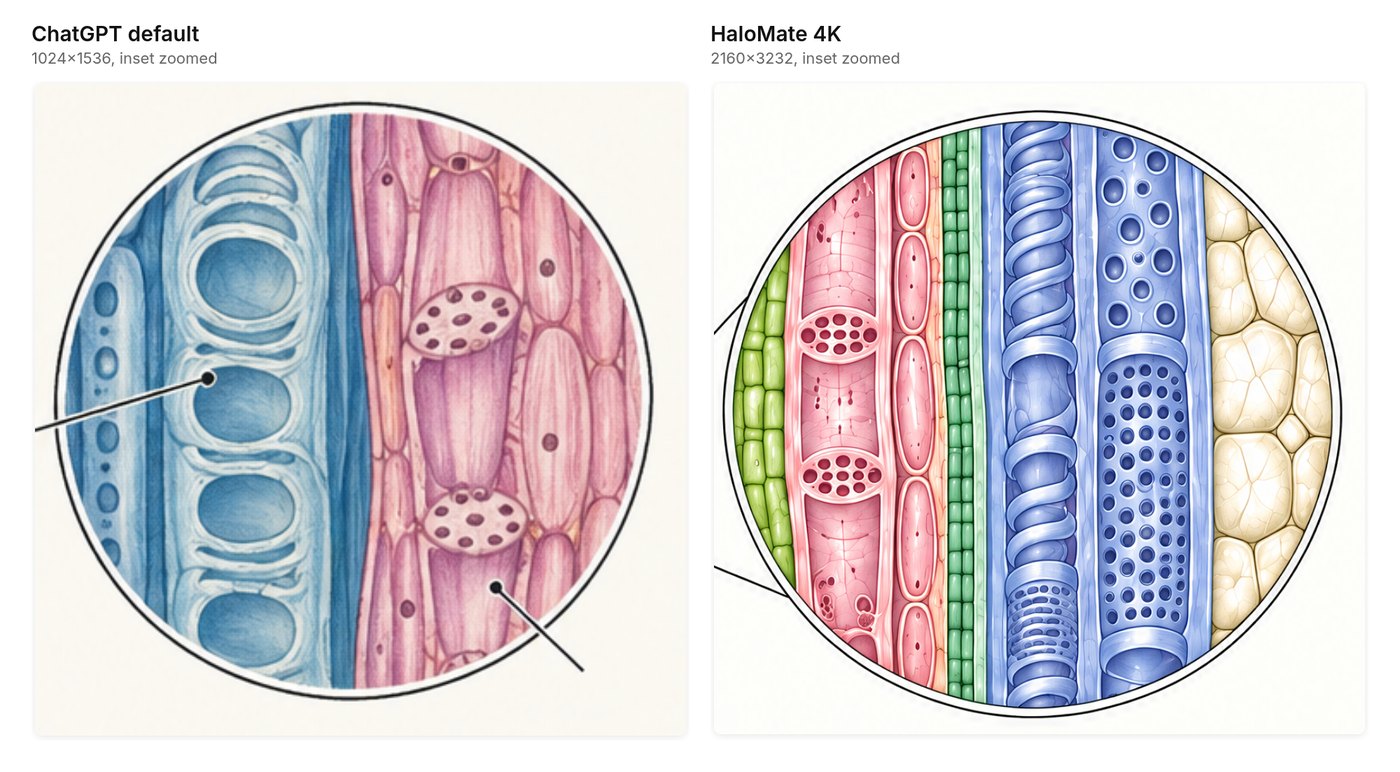
(Answer to the guess: A is ChatGPT, B is HaloMate.)
Honestly, the bigger difference in my test wasn't the pixel count. Look at the vessel inset: in the HaloMate version, the xylem shows spiral and pitted vessels and the phloem has visible sieve plates. The ChatGPT version got the overall look right, but the vessels came out as stacked rings, more like a windpipe than a xylem vessel, and the sieve tubes had nuclei in them, which sieve tubes don't have. I'm not a botanist, but the vessel anatomy is visibly off. More pixels didn't buy more correctness in the first place.
My guess is that this comes down to the engine. Sunburst is the precision model, and in ChatGPT you don't know which one you're getting. I can't prove that from one prompt, so treat it as an observation, not a benchmark.
What it doesn't have: Sketch. Edits happen through conversation only. If you like circling a spot and drawing what you want, ChatGPT is still smoother for that. Higher resolutions also cost more, so I don't generate everything at 4K by default. Rough ideas at default size, final version at 2K or 4K.
Method 3: Run it through an upscaler
Generate in ChatGPT, then upscale with something like Upscayl (free, open source) or Topaz Gigapixel (paid). This is what most people on r/printondemand end up doing.
It works, in the sense that you get a 4K file. An upscaler adds pixels, though. It doesn't add correctness. It guesses what the missing detail should look like. For a landscape wallpaper that's fine. For my stem section, it would just give me a sharper version of whatever the model got wrong. If the vessel structure is off at 1024px, it's still off at 4K, only now in high definition.
Method 4: Call the OpenAI API directly
This is the "real" way. Through the API you can pick Flare or Sunburst, set the size up to 3840px, and choose the quality level. Pricing is on OpenAI's API pricing page, and higher quality at larger sizes costs noticeably more per image.
You need an API key, a bit of code, and a card on file. Pay per image, no chat interface, no easy back and forth. Great for developers or batch jobs. Overkill if you just want one good figure for a slide deck.
Method 5: Use a third-party platform that exposes the settings
A lot of platforms picked up Images 2.5 on launch day. OpenArt, Morphic and others give you a UI on top of the API, with resolution and quality dropdowns.
Each one exposes a different slice. Some only offer Flare, some cap resolution, some price 4K very differently. And it's another tab, another account, another place your images live, disconnected from whatever you were actually working on.
Bonus: when you need labels, skip pixels altogether
You might have noticed my prompt says "no text". That's deliberate. Image models are still unreliable with dense labels, and a figure with one misspelled tissue name is worse than no labels at all.
So for a labeled version, I asked HaloMate for an SVG instead. The assistant wrote the figure directly as vector code, with every label as real text and each tissue layer as its own group. Then I opened it in the editor, clicked a layer and changed its color. Typos, font, position, all fixable without regenerating anything. Every edit, mine or the assistant's, saved as a separate version I can roll back to.
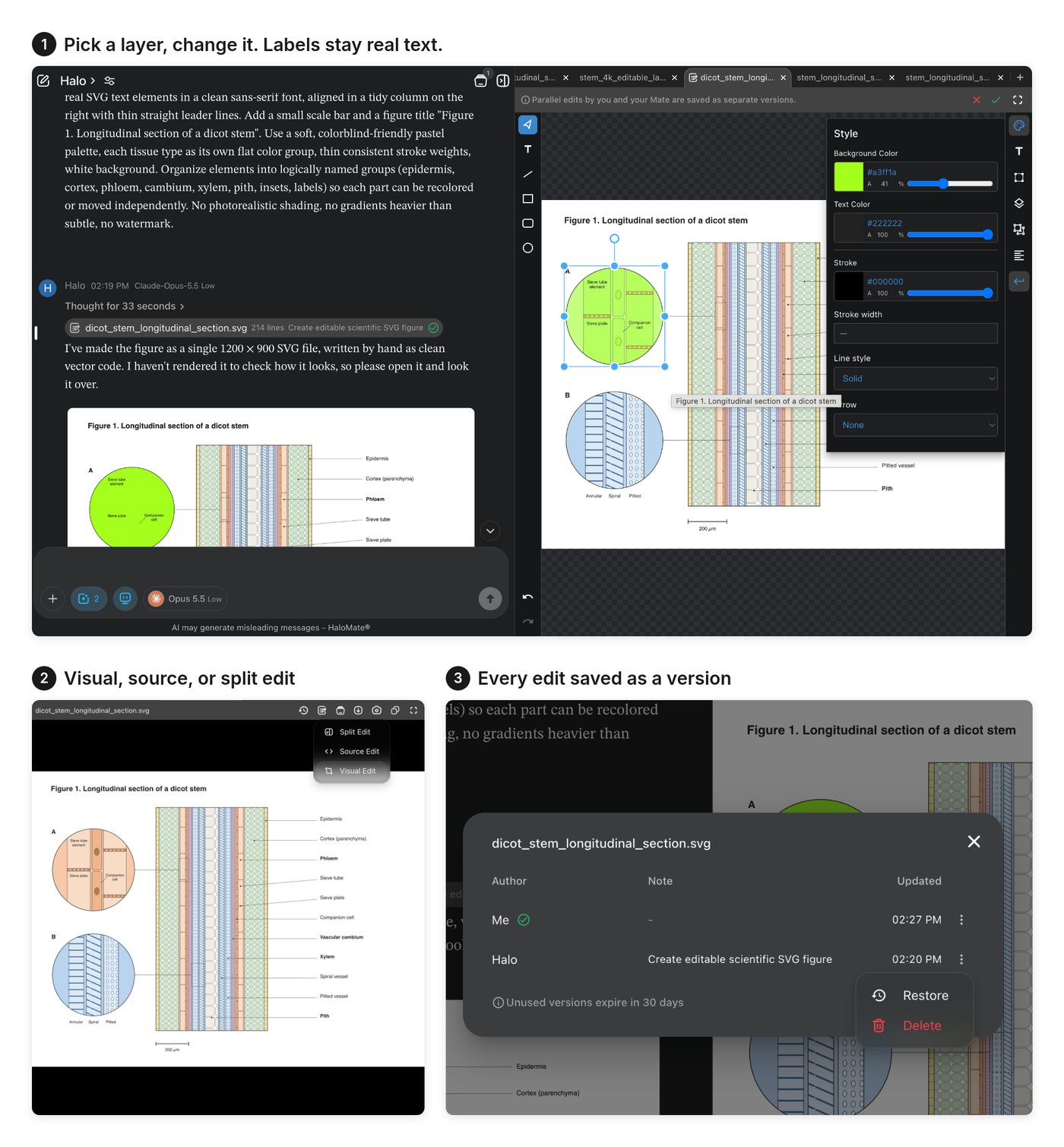
One honest note: the assistant told me it hadn't rendered the file to check how it looked, and asked me to review it. Fair enough. For a publication figure you'd want a human pass anyway.
FAQ
Does ChatGPT support 4K image generation?
Not in the app, as far as I can tell. Images 2.5 is on free and paid tiers, but there's still no resolution control in ChatGPT itself. Native 2K/4K shows up when you go through the API, or through a tool that calls the API for you.
Why does ChatGPT say yes to 4K but still download at 1024×1536?
Because "4K" in the prompt is treated like a style hint, not a file-size setting. The model can redraw the scene. The downloader still hands you the app's default dimensions. Check Get Info (or Properties) on the file before you trust the chat reply.
What's the difference between GPT-Image-2.5 Flare and Sunburst?
OpenAI positions Flare as the fast default and Sunburst as the slower precision option for detailed creative work. Both are named for developers in the API. ChatGPT does not let you pick which one you get. In my HaloMate run log, the 4K pass used Sunburst. That is one data point, not a bake-off.
Is upscaling the same as generating at 4K?
No. Upscaling invents pixels from an existing file. Generating at 2K or 4K asks the image model for a higher-res render (in my case, with the lower-res version as a reference so composition stays put). If the anatomy is wrong at 1024px, a bigger upscale just freezes the mistake in higher definition.
So which one should you use?
Depends on what you're doing.
- Just playing, lots of quick edits, don't care about pixels: ChatGPT. Sketch and flat pricing are hard to beat.
- Already have an image and need it bigger: an upscaler, as long as the image is correct to begin with.
- Building something or generating in bulk: the API.
- Need a finished, high-res image that's part of a bigger project: HaloMate, or anything else that keeps your project files and image generation in the same place.
It was never really a model problem. ChatGPT and the API are running the same model family. The difference is what each door lets you touch, and whether the image gets made next to the rest of your work or in a tab of its own.
Same prompt is above. Try it in whatever you use and see what you get.